SSH, files, remote desktop, Docker and virtual machines in one app, with an AI agent that does the work on your servers, step by step and with your permission. It warns you when something goes wrong, and your servers are on all your devices without going through any cloud.
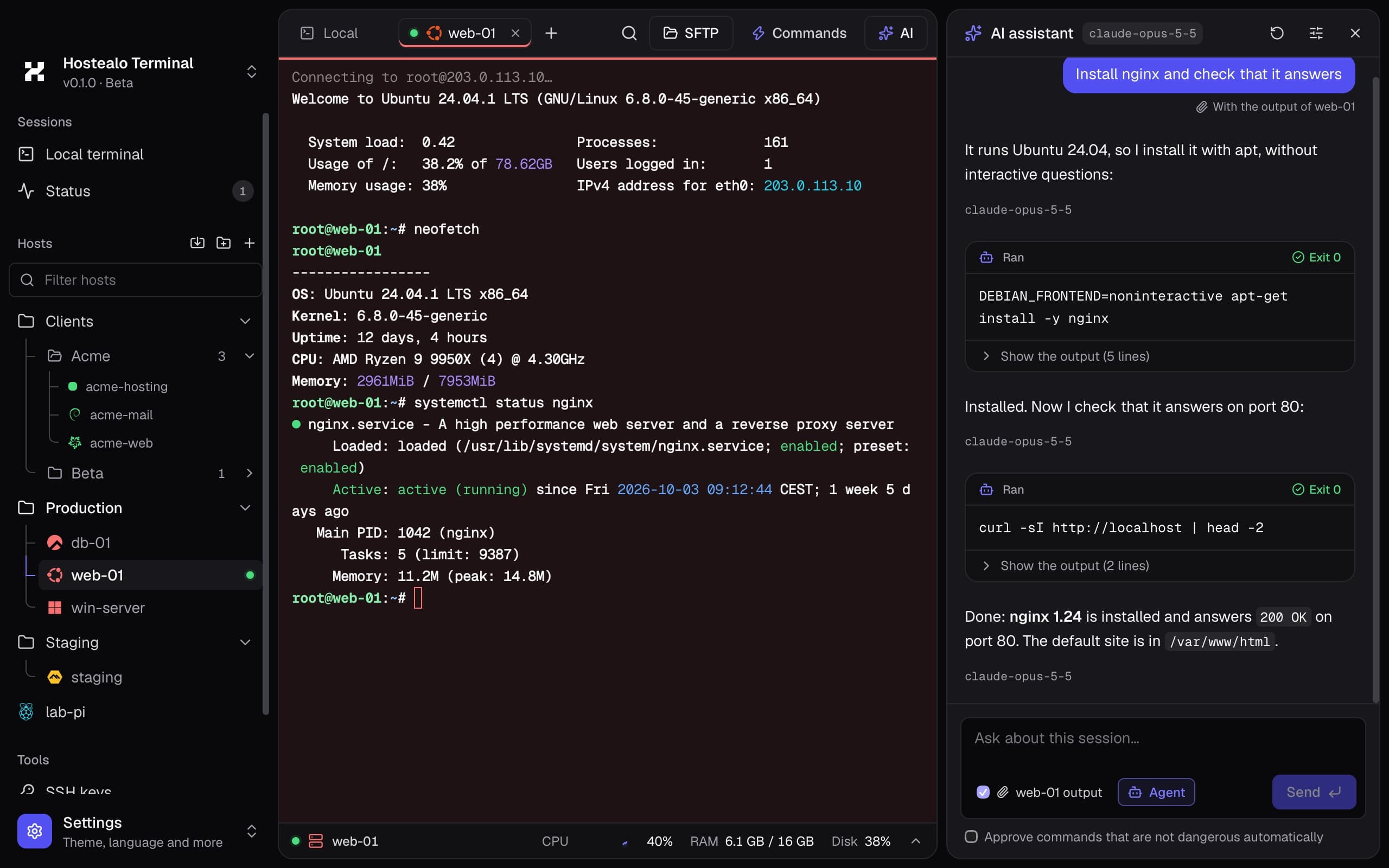
CPU, memory, disk and network live under the terminal, with nothing installed on the server. And the output is colored automatically, so what matters stands out.
Live monitor
Click the bar to see every disk, the load and how long it has been up.
Colored output
IPs, errors, paths and dates highlighted in any program.
One tab per server
A click takes you to the session you already have open; a right click opens another.
Ask the AI
When something fails, the assistant reads the output and explains what happened.
AI assistant
Tellitwhatyouwantandwatchitwork
“Install nginx and check that it responds.” The assistant checks which system your server runs, proposes each command, runs it when you allow it and reads the result before moving on.
With your permission
Every command waits for your approval; dangerous ones are flagged in red.
Your AI, not ours
Claude, OpenAI or Ollama running locally. And no API key needed if you use Claude Code.
Understands the terminal
Reads the recent output to explain an error or what is going on.
Agent mode
Chains the steps, checks every result and sums up what it did.
⌘K · ⌘P
Anyserver,twokeysaway
⌘K searches your servers, open tabs, commands and the app's actions. ⌘P opens your quick commands to run them in the session. On Windows and Linux, use Ctrl.
Global search
Part of the name, the IP or the folder. Enter takes you to the session; ⌘Enter opens a new one.
Quick commands
“Restart nginx”, “Disk space”… one click away on any server, and on all your computers.
No surprises
If a command could delete data or shut the server down, it asks you to confirm first.
Multi-line
Save a whole script: it runs line by line in the open session.
Sync without a cloud
Yourservers,onallyourcomputers
You add a server on your laptop and want it on your office PC too, with its folders and your quick commands. No accounts to create and no credentials uploaded to any cloud: the devices talk to each other.
Direct, over your network
With both devices on the same Wi-Fi they find each other. The data goes from one to the other without touching the internet.
One QR code and done
If the network keeps them from seeing each other, scan the QR code or paste its link. Nobody can get in the middle.
Encrypted and verified
Fresh keys for every sync and a code you check on both screens. Passwords only if you tick the box.
New computer?
Export everything to a file encrypted with your password and open it on the other machine. If it already had servers, they are merged.
LaptopmacOS482 913
Office PCWindows482 913
Local network onlyEnd-to-end encryptedPaired with a QR code
Mac, Windows and Linux with each other today; with your phone as soon as the app is out.
Status and alerts
Itwarnsyoubeforethediskfillsup
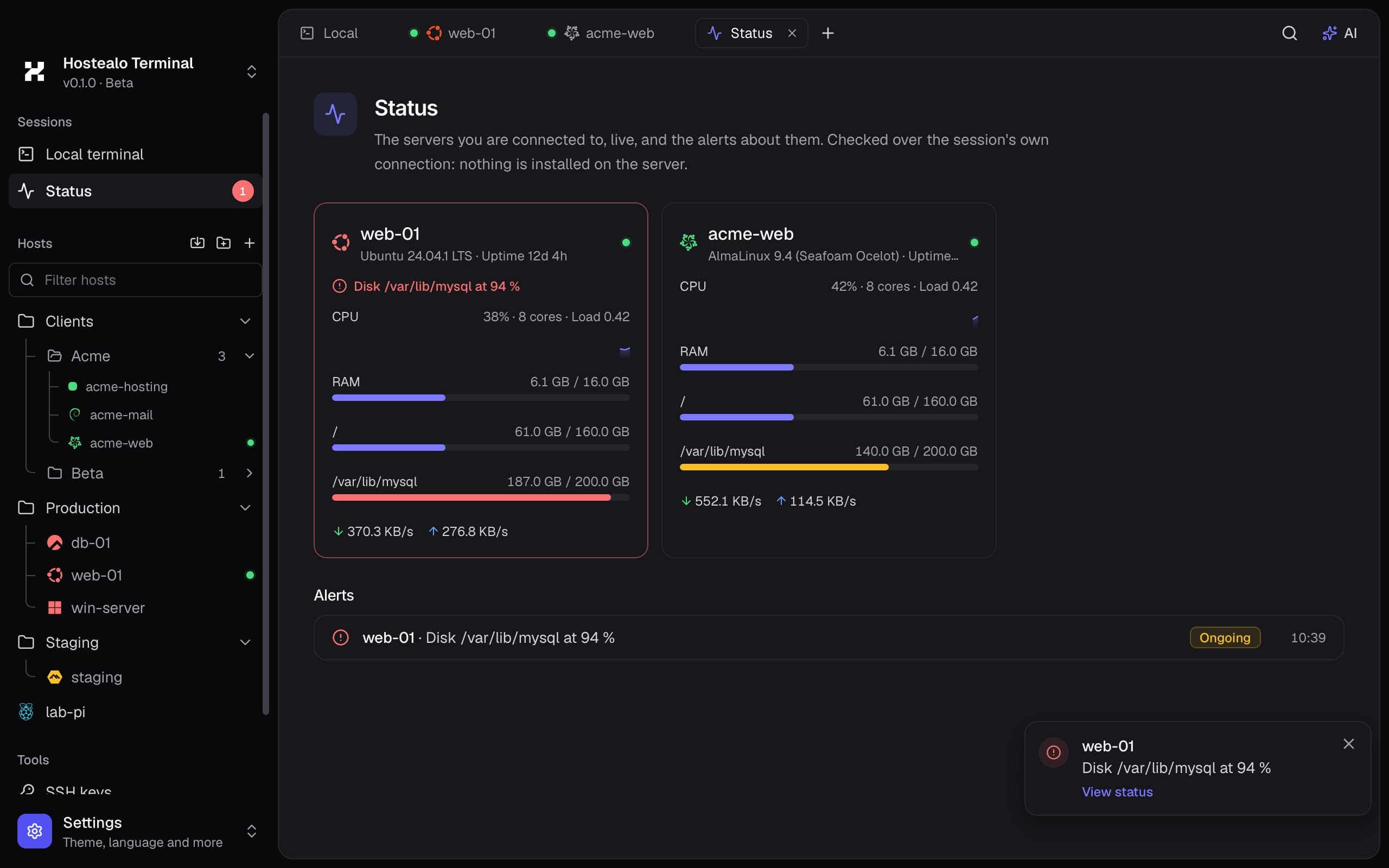
One tab with every server you are connected to, live. If a disk fills up, memory or CPU stay high or a session drops, it tells you in the app and with a system notification.
Everything at a glance
CPU, memory, every disk and the network of each open session.
Alerts that don't nag
Only when the problem lasts, and it tells you when it is resolved.
Your thresholds
Choose in Settings from which percentage you want to be warned.
Nothing to install
It uses the session's own connection; there are no agents on the server.
Docker · Proxmox · KVM
Yourcontainersandmachines,withoutanotherpanel
From the menu of any server, over the same SSH connection and with the tools it already has. No API to enable and nothing to install.
Docker
The server's containers grouped by Compose project, with their image, state, ports and the memory they use.
Start, stop, restart or remove
Live logs
A shell inside the container in one click
If your user isn't in the docker group, it tries with sudo
Proxmox, KVM and SolusVM
The virtual machines of a Proxmox VE node or a KVM server with libvirt, such as SolusVM 2 nodes, with their state and resources.
Power on, shut down cleanly or reboot
Force power off, with confirmation
Open a machine's console
The whole Proxmox cluster in one list
For Hostealo customers
Yourservers,alreadythere
Connect your account once and your VPS and dedicated servers appear in the sidebar on their own, with their system's logo and an IP that is always current.
Syncs with your client area on its own every few minutes
If the IP changes, it updates itself
Power on, shut down and reboot your VPS from the app
Reset the root password without opening the panel
Andwhatyoudotodaywithfiveprograms
Terminal, files, remote desktop, containers and virtual machines, with one design and your servers in one place.
SSH with a resource monitor
The server's CPU, memory, disk and network live under the terminal, with nothing installed on it. And the output is colored automatically: IPs, errors, dates.
Two-pane SFTP and FTP
Your computer on one side and the server on the other, as in FileZilla. Drag to upload or download, with parallel transfers.
Remote desktop (RDP)
Fills the window with no black bars, with sound on your Mac, a file clipboard and one of your folders as a drive.
Docker
Containers by Compose project: start them, stop them, watch their live logs or open a shell inside.
Proxmox, KVM and SolusVM
The node's virtual machines with their state and resources. Power them on, shut them down or open their console.
Status and alerts
Every server you are connected to in one tab, and an alert if a disk fills up or a session drops.
Quick commands
Save the commands you repeat and run them on any server with ⌘P. They sync to your other computers.
Folders and colors
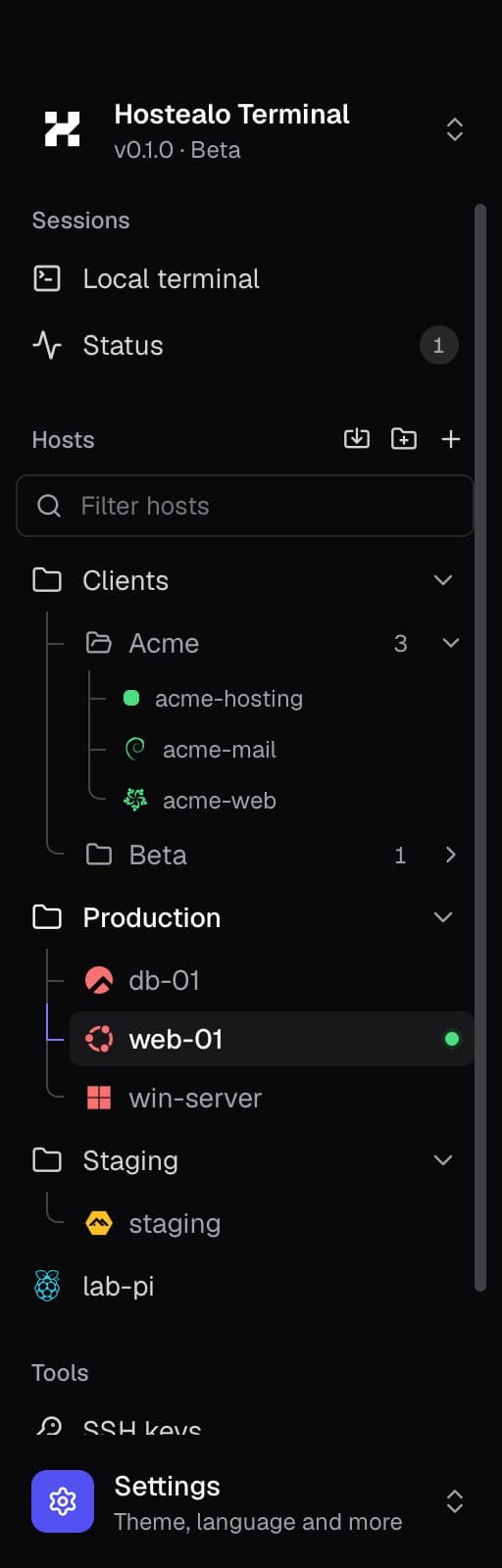
Organize by customer. The tab takes the server's color, so you never type in production thinking it's staging.
Bring what you already have
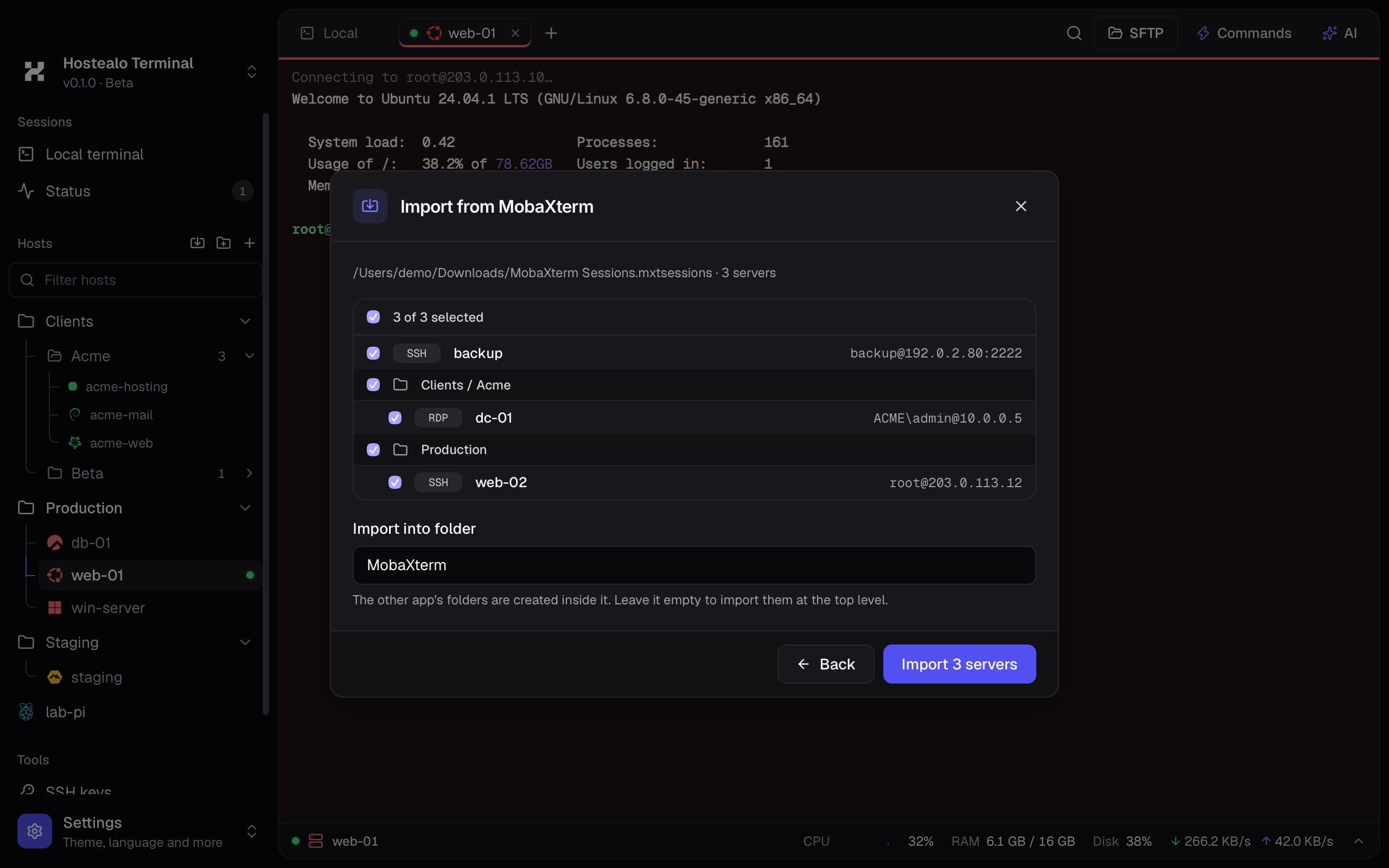
Import your servers from MobaXterm, Royal TS, PuTTY, FileZilla or OpenSSH, with their folders. And manage your SSH keys.
SFTP · FTP · FTPS
Yourcomputerononeside,theserverontheother
As in FileZilla, with Hostealo's design: drag between panes to upload and download, with several transfers at once and their progress in view. Also on Windows servers with OpenSSH.
Remote desktop
RDPthatactuallyworksonyourMac
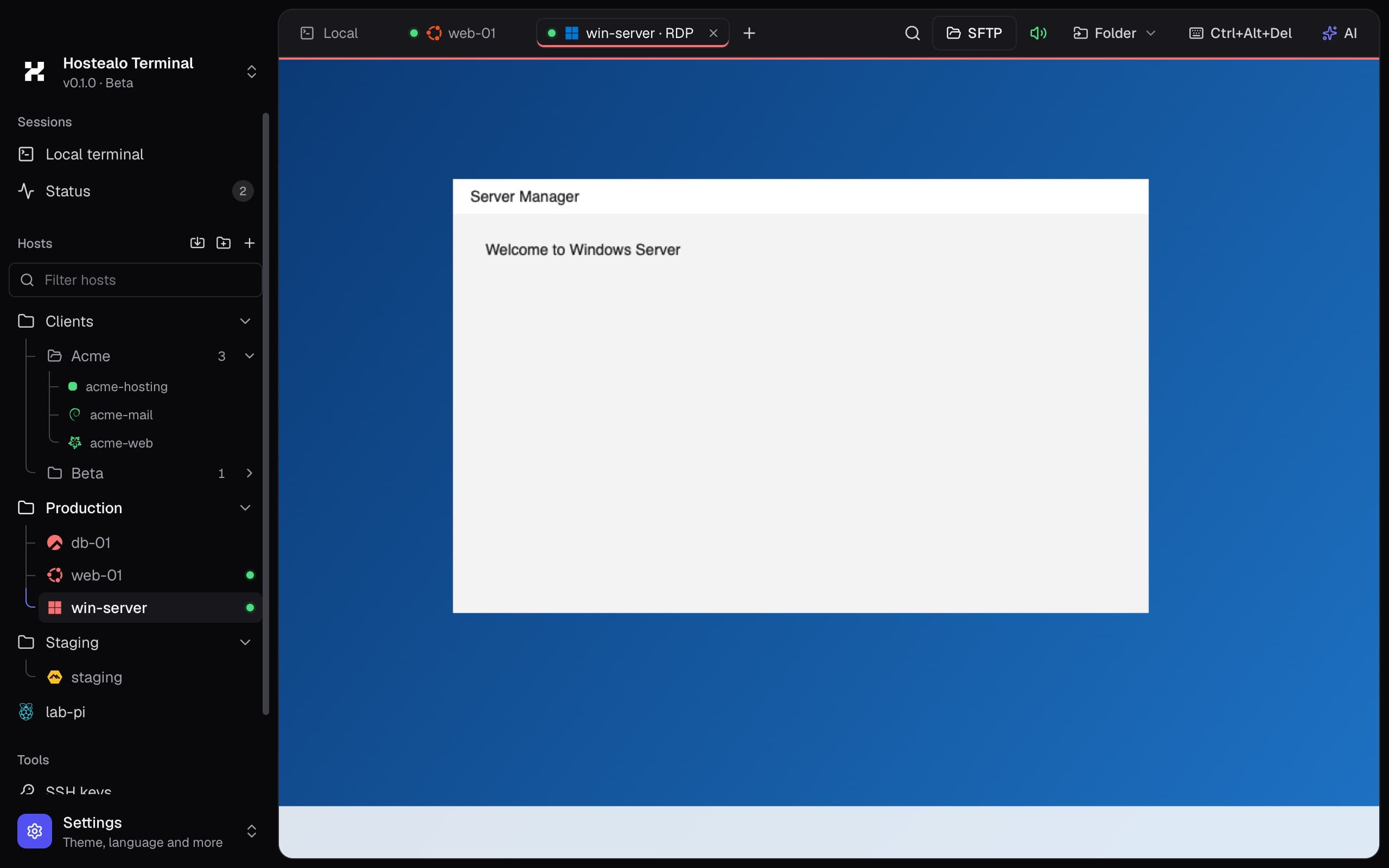
What fails in other clients, solved: the black bars, the sound, the clipboard and moving files to the server.
Fills the window
The desktop fits the window's size, with no black bars, and adapts when you resize it.
The sound arrives, and you can tell
The server's audio plays on your computer, on a Mac too. An indicator in the bar tells you whether it is coming through.
Your folder, on the server
Pick a folder on your computer from the bar and it shows up as a drive in Windows.
Copy and paste that doesn't break
Text, images and files both ways, without the clipboard giving up halfway through a session.
Its files, over SFTP
If the server has OpenSSH, open its file manager from the same tab or with a right click.
Don't start from scratch
Bringyourserversinaminute
Import from MobaXterm, Royal TS, PuTTY, FileZilla, ~/.ssh/config or .rdp files. It keeps your folders and marks the ones you already have so you don't duplicate them.
Public source code
Youraccess,yoursalone
A terminal holds the keys to your servers. That's why its code is public and your secrets never leave your computer.
Passwords in your keychain
Stored in the system keychain, never in a file of the app.
Revealed with Touch ID
To show a saved password, your Mac asks for your fingerprint or your password.
Verified host keys
If a server's host key changes, we warn you; it is never accepted silently.
Encrypted copies
Between your computers, with fresh keys every time; in a file, with your password.
No account, no cloud
No sign-up, and your servers are not stored on any server, not even Hostealo's.
Public source code
You can read and audit all the code: you know exactly what it does with your access.
An app for Mac, Windows and Linux that brings together everything you use to manage servers: SSH terminal, SFTP and FTP file manager, RDP remote desktop, Docker, virtual machines, alerts and an AI assistant.
Is it free?
Yes. The app is free and its code is public. You only pay, if you want, for the AI provider you connect; you can also use your Claude subscription or a local model with Ollama.
Do I need to be a Hostealo customer?
No. It works with any server. If you are a customer, you can connect your account and your VPS and dedicated servers show up on their own, with their IP kept current, and you can power them on, shut them down, reboot them or reset their root password from the app. The list updates itself every few minutes.
Where are my passwords and keys stored?
In your system's keychain (macOS Keychain, Windows Credential Manager or Secret Service on Linux). The app never writes them to its files or sends them anywhere.
Does the AI run things on my servers?
Only if you want it to. By default it suggests commands that you insert or run with a click. In agent mode it runs the steps itself, but every command asks for your permission first and dangerous ones are flagged.
What does the AI see of my server?
What you decide: the session details and, if you tick the box, the last lines of the terminal. They are sent only to the provider you configured, never to Hostealo.
How do I move my servers to another computer or my phone?
Open “Sync devices” on both. On the same network they find each other; otherwise, scan the QR code. For a new computer, export a password-encrypted copy and open it there. Everything goes directly from one device to the other, encrypted: nothing passes through the internet or our servers.
Do I need to install anything on the server?
No. The resource monitor, alerts, Docker and virtual machines use the same SSH connection and the tools the server already has (docker, pvesh or virsh). No agents to install, ports to open or APIs to enable.
Does it work with Proxmox or SolusVM?
Yes. On a Proxmox VE node you see the machines of the whole cluster; on a KVM server with libvirt, such as a SolusVM 2 node, it manages them with virsh. You can power them on, shut them down, reboot them or open their console; the SolusVM panel picks up the changes on its next sync.
When does it warn me?
When a disk goes over 90%, memory stays high for more than a minute, CPU for more than two, or a session drops. The thresholds can be changed in Settings, and the alert shows in the app and, if you want, as a system notification.
Does the demo connect to anything?
No. It's the real app running in your browser with sample data: the servers, the files and the AI's answers are simulated, and no connection leaves your browser.
Can I bring my servers from another program?
Yes: MobaXterm, Royal TS and TSX, PuTTY, FileZilla, the ~/.ssh/config file and .rdp files, with their folders. Those programs' encrypted passwords are not imported; the app asks for them when you connect.
Is it open source?
The code is public under the Functional Source License (FSL): you or your company can read, audit, modify and use it for anything except building a product that competes with it. Every version becomes Apache 2.0 licensed after two years.
Open beta
Whatisyourterminalmissing?
We're building it with the people who use it every day. Tell us what you miss or what you'd like it to do.